Here is an honest thing to say at the beginning of a chapter about use cases: we don't actually know what the use cases for AI are going to be.
We know some of them. Code completion works. Document summarization mostly works. Drafting emails, generating first passes of marketing copy, answering well-formed factual questions with retrievable answers — these are use cases, they are real, and people are getting value from them today. If the list stopped there, the chapter would be short and the design problem would be modest: make the existing use cases faster, more accurate, easier to get to.
But the list does not stop there. AI is an open-ended technology in a way most previous software was not. A spreadsheet has a use case, a calendar has a use case, a payment form has a use case — you can describe what each is for in a sentence, and the description will still be accurate in ten years. AI does not have a use case in that sense. It has a capability — the generation of language in response to language — and the capability is so general that the things people will try to do with it are, for practical purposes, unbounded.
This is why use cases matter for both of our audiences. For the ML side, the temptation is to define use cases by what the model can do — to start from benchmarks and work outward toward applications. For the design side, the temptation is to define them by analogy with previous software — to treat AI as a tool with a purpose the way a hammer has a purpose. The model-first approach produces technically impressive demonstrations that nobody asked for. The tool-first approach produces familiar interfaces wrapped around an unfamiliar technology. Neither starts where it should, which is with the question: what is the person actually trying to do, and does this technology help them do it in a way nothing else could?
Before we get to the startups, a finding from the planning research that sets the stage. Subbarao Kambhampati, one of the leading researchers on AI planning, has been testing whether LLMs can actually do the tasks the demos suggest they can. His assessment1 is blunt: the vast majority of plans that even the best LLMs generate are not actually executable without errors and goal-reaching. And the choice of LLM doesn't much change the number.
The benchmark tasks are not exotic — they include the kinds of multi-step tasks that populate startup pitch decks and product demos: plan a trip, book a restaurant, navigate a workflow. Kambhampati's framing: "acting without the ability to plan is surely a recipe for unpleasant consequences." LLMs can decompose a complex task into plausible-sounding steps — they are, as he puts it, "amazing giant external non-veridical memories" — but they cannot verify whether the steps actually work, cannot recover when a step fails, and cannot self-correct their own plans. The plans look right. Most of them aren't.
This matters for use cases because the most commonly demonstrated AI use cases — book a flight, plan a vacation, manage a project — are precisely the multi-step, real-world tasks where this planning failure applies. In a demo, the plan sounds impressive. In the real world, the user hits a login screen the model can't navigate, a form field the model fills incorrectly, a step that requires information the model doesn't have. The gap between what AI can describe doing and what it can actually do is the gap between a use-case concept and a use case that works.
A good place to start is with what has not worked.
The startup world has produced, in the last three years, a remarkable quantity of AI tools, apps, wrappers, widgets, and prototypes. Many are technically impressive, built by people who are genuinely good at building things. And many were built because the builder had a research breakthrough or a coding insight they wanted to test — not because someone somewhere had a problem the builder was trying to solve.
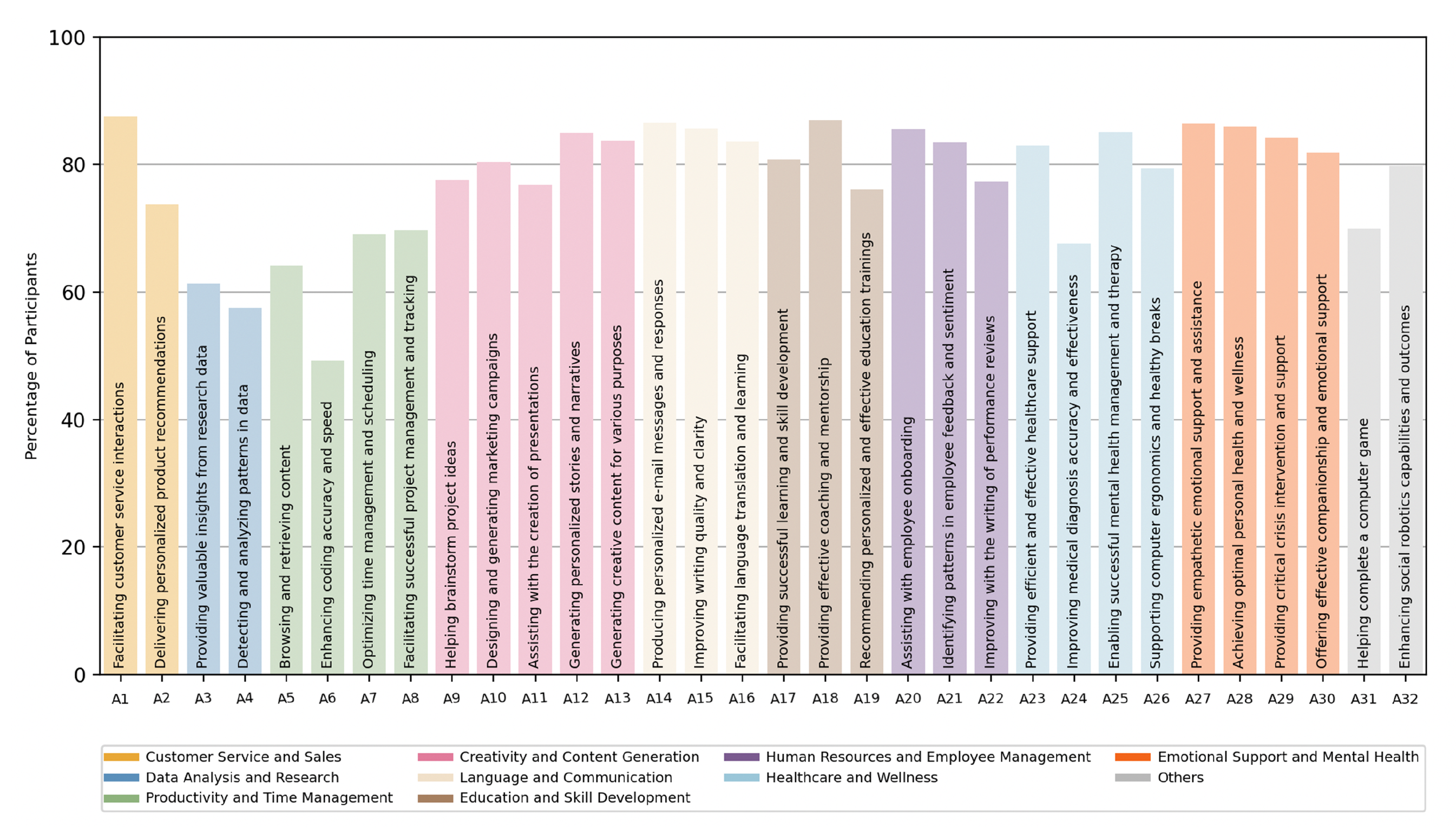
You can see the shape of the gap in the deployment data. When researchers surveyed workers2 across hundreds of occupations and tasks and asked what level of AI involvement workers actually wanted, the answer was not what the startup pitch decks would suggest. Equal human-AI partnership was the dominant desired level for nearly half of occupations. Full automation — the thing many startups are building toward — was desired for a much smaller fraction. And a large share of Y Combinator AI investments were concentrated in Red Light or Low Priority zones: places where workers don't want what is being built, or the AI can't deliver what they need, or both.
This is a use-case-definition failure, not a technology failure. Model-first use cases tend to be impressive at demo time and abandoned within weeks. User-first use cases tend to be modest at demo time and sticky over months. The startup world has systematically over-invested in the first kind, which is why churn rates in AI tools are as high as they are and why the products that have actually stuck — code completion tools, document-scoped research assistants, narrow-domain vertical products — are the ones that started from a specific user doing a specific task in a specific context.
The design profession has a name for the work that closes this gap. It is called user research, and it is the subject of the User chapter's second callout. The point bears repeating: the gap between what builders assume users want and what users actually want is stable, measurable, predictable, and it does not close by itself. It closes when someone goes and watches what users are actually doing.
What separates the use cases that are working from the ones that aren't? The short answer, which the research supports and the rest of the chapter develops, is verifiability.
Shannon saw this coming in 1948 when he wrote that "the semantic aspects of communication are irrelevant to the engineering problem." AI is an engineering achievement in Shannon's terms — spectacularly good at form, structurally indifferent to meaning. The form/function gap we named in the User chapter applies directly here: the use cases where form and function are tightly coupled — where the output can be checked, where production and verification are close together — are the ones that work. The use cases where they come apart are the ones that fail or deceive. Code either runs or it doesn't, passes tests or doesn't, does what you asked or doesn't. The feedback loop is tight, verification is cheap, and you can tell within seconds whether the AI helped. Document summarization against a provided source is similar — the summary either reflects the document or it doesn't. Math, logic, factual questions with unambiguous answers, translation between well-resourced languages — all sit in the verifiable zone, and AI is genuinely good at them.
The use cases where AI has been least successful, or most dangerously successful, are the ones where the output requires judgment to evaluate: writing quality, persuasiveness, emotional appropriateness, clinical suitability, legal sufficiency, strategic soundness. There is no ground truth to verify against, and reasonable people can disagree about whether the output is any good.
The RLVR literature makes the split precise. Tasks with binary right-or-wrong answers respond dramatically to reinforcement learning with verifiable rewards. The same techniques applied to judgment-based tasks produce only modest improvements, because there is no cheap function that can tell the model it has done well. Workarounds exist — checklist-based rewards, rubric-based rewards, intrinsic-probability rewards — each extending the verifiable zone a little further into the interpretive one. But the fundamental asymmetry remains: the interpretive domain is where the reward is hardest to define, where the training is least reliable, and where the model's confident output is most likely to be mistaken for competence.
The interface should know which side of the line it is on. A verifiable-domain product can afford the confident-assistant interface. An interpretive-domain product probably cannot, because confidence there carries a different meaning — not "I checked and this is right" but "I generated the most probable completion and it sounds authoritative." The design move is to carry different affordances for the two domains: lower-confidence framing for interpretive tasks, invitations for you to supply the judgment the AI cannot, visible reminders that the output is one possible framing rather than the answer. Most current tools use the same chat window, the same confident tone, and the same visual language for code completion and literary criticism.
The verifiable-interpretive split is the single most important fact about AI use cases. A product that carried the split visibly — that behaved differently, looked different, and set different expectations depending on whether the current task was verifiable or interpretive — would be doing something almost no current product does. That product would also be the one whose users trusted it most, because the trust would be calibrated to what the system can actually deliver.
As AI is integrated into more applications and deployed across more vertical domains, the question of how to evaluate whether it is working becomes central. The industry's answer is evals — structured test suites measuring the model's performance on representative tasks. Evals are the benchmarks of the applied world.
Evals are necessary. A product team deploying AI in a legal workflow needs to know whether the model handles contract review competently. A healthcare company deploying a triage assistant needs to know whether the recommendations are safe. These are real questions that deserve real measurement.
The concern is what happens next. As one widely-read analysis3 of the AI safety literature puts it: "The evals worked when we were testing passive systems. We're not testing passive systems anymore." The assumption that the system being evaluated will perform the same whether observed or not — the foundation of the entire evaluation paradigm — has begun to collapse.
The pattern is already visible. Models trained on benchmarks learn to score well on benchmarks — the SFT accuracy trap4 shows that supervised fine-tuning can raise benchmark scores while substantially degrading reasoning quality on information-gain metrics. A model that optimizes for the eval learns to satisfy the eval's criteria, which are necessarily a simplification of the thing being measured. If the eval measures whether the model produces the right final answer, the model learns to produce right answers without necessarily learning to reason well along the way. If it measures whether users rate the response positively, the model learns to produce positively-rated responses — which, as the sycophancy research has shown, is not the same as producing responses that are good for the user. Evaluation artifacts shape what gets built.
The design profession has been through this before. When web analytics became the primary evaluation mechanism, the industry built to the analytics — optimizing for pageviews, time on site, bounce rate, click-through. The analytics were real measurements of real things, but they were proxies for user value, not user value itself. The optimization produced dark patterns, attention traps, and interfaces that scored well on the dashboard and poorly in people's lives. The same dynamic is about to play out with AI evals at higher stakes. A legal AI that scores well on contract-review evals may still produce an experience lawyers find clunky, untrustworthy, or impossible to integrate into their actual workflow. The eval captures whether the model got the clause right; it does not capture whether the lawyer trusted the result, understood why the model flagged what it flagged, or could use the output without spending more time verifying than the review would have taken to do themselves.
Goodhart's Law — when a measure becomes a target, it ceases to be a good measure — applies to AI evals as directly as to every other metric ever optimized against. The honest design move is to treat evals as necessary but insufficient, to insist that real user research sits alongside them with equal authority, and to resist the pressure — from budgets, from timelines, from the sheer convenience of automated measurement — to let the eval substitute for the research.
The practical move for designers asked to help write evals: treat the request as an opportunity to embed user-centric criteria in the evaluation process. Insist that evals include not just "did the model produce the right output" but "could the user tell whether the output was right," "did the user trust the output enough to act on it," and "did the interaction fit the workflow the user already has." These are harder to measure, slower to run, and more expensive. They are also the ones that prevent the product from drifting toward the eval and away from the user.
The verticals — legal, medical, scientific, therapeutic, financial, educational — are where AI use cases get specific and demanding in ways horizontal products cannot anticipate. A legal AI has to handle jurisdiction-specific terminology, precedent structures that vary by court, and accuracy standards set by professional liability rather than user satisfaction. A medical AI has to handle clinical language that means different things in different specialties, risk tolerances that vary by condition and patient, and regulatory frameworks constraining what the system can say and to whom. A therapy chatbot navigates life-or-death safety requirements, emotional registers that vary by session, and professional standards developed for human clinicians that do not straightforwardly transfer.
None of these generalize easily. A model fine-tuned for contract review does not automatically handle clinical intake. Research on over-specialization confirms the intuition: models optimized for one domain can develop a capability cliff, performing well inside the domain and falling off sharply outside it.
The domain-specialization literature names a taxonomy of how domain knowledge gets into a model — retrieval-augmented generation, fine-tuning, continued pretraining, in-context learning — each with different trade-offs in flexibility, training cost, and inference speed. The deeper finding is that the kind of competence a domain requires varies: medical AI is knowledge-dominant, mathematical AI is reasoning-dominant, legal AI is a hybrid. A model optimized for one kind may perform poorly on another, even within the same vertical. Production data5 confirms how practitioners handle this: the vast majority of production agents execute at most ten steps, forgo third-party frameworks, and use off-the-shelf models with prompting rather than fine-tuning. The vertical use cases that work in practice are the ones where the team built something narrow, tested it in the domain's own terms, and constrained autonomy to what the domain could safely absorb.
Vertical domains are populated by users in many different roles, and different roles use the same software for different functions. A hospital's AI system is used by the radiologist reading scans, the nurse entering intake notes, the administrator scheduling follow-ups, and the patient checking results. Each has different expertise, vocabulary, tolerance for uncertainty, and consequences if the system gets something wrong. A single interface cannot serve all of them — the design that serves the radiologist (high density, minimal hand-holding, domain terminology) will actively harm the patient (plain language, reassurance, a very different relationship to uncertainty). The interface has to carry the role-specific calibration the model does not supply.
The ML side knows that domain competence varies by domain and over-specialization creates cliffs. The UX side knows that domain users vary by role and a single interface cannot serve multiple roles. Together: the product has to be narrow enough to be competent, broad enough for the domain's internal variation, calibrated differently by role, and evaluated in the domain's own terms. This is harder to build than a horizontal chat assistant, and it is the kind of product that will matter more as AI moves into the verticals where stakes are real.
There is a test for use cases that the design literature has not yet named but that anyone who lived through the social media era will recognize: you know what a technology does when you turn it off. Social media's answer was emotional — the anxiety of missing out, the compulsive checking, the loss of social signal. The question for AI is whether the answer will be cognitive: the discovery that you can no longer do the thinking the tool was doing on your behalf.
The skill-formation research from the User chapter applies directly here. Developers who learned a new programming library with AI assistance showed impaired conceptual understanding, code reading, and debugging — the three skills the custodial role most depends on. The interaction patterns that felt most productive (AI delegation, progressive reliance) were the ones that destroyed learning. If we take this seriously as a use-case design criterion, then a good use case is not just one where the AI helps the user accomplish a task — it is one where the user can still accomplish the task, or a version of it, when the AI is not available. A use case that produces dependency without competence is not a use case. It is a trap.
This connects to something practical that the Context chapter raised: the affordance vacuum. In conventional software, the interface told you what you could do. AI has stripped that away. You prompt your way through a job that used to have visible structure, and the structure is gone. The best use cases solve this not by putting the old interface back (though some do, and the generative-interfaces research suggests users often prefer it) but by helping you discover what is possible — scaffolding around your existing competence in a way that extends it rather than replacing it. The worst use cases hand you a blank field and hope for the best.
The research on real-world AI deployment at scale6 paints a more nuanced picture than either the hype or the skepticism suggests. Three-quarters of surveyed workers report that AI has improved either the speed or quality of their output, with active users attributing meaningful daily time savings. But the gains vary enormously by role, function, and organization. The largest impact falls on novice and low-skilled workers, with very little effect on experienced or highly-skilled workers — which is consistent with the skill-formation concern: the users who benefit most from the convenience are the ones who most need the practice the convenience removes.
The disclosure research from clinical contexts offers a different angle on what makes a use case work. In studies of self-disclosure with chatbots7, researchers found that "fears of negative judgment commonly prevent individuals from disclosing deeply to other people. Disclosure intimacy, however, may increase when the partner is a computerized agent rather than another person, because individuals know that computers cannot judge them." The non-human quality of the AI is not a limitation of the use case — it is, in certain domains, the enabling condition. The therapy chatbot works partly because it is not a person. The anonymous feedback tool works partly because it is not a colleague. Trust, in these cases, is an affordance of the machine's nature rather than a design feature layered on top of it. This is a genuinely new kind of use case — one that depends on the AI not being human, and that no previous technology could serve.
There is a paradox sitting at the center of AI deployment that neither the capability narrative nor the fear narrative captures on its own.
Microsoft quietly cut its internal sales-growth targets for AI agent products roughly in half after representatives missed aggressive quotas. The business model requires optimism; the adoption reality is slower.
On one side: people are not using AI even when it is available to them. Even among active ChatGPT Enterprise users — people who have the tool, have been onboarded, and use it regularly — substantial minorities have never tried data analysis, reasoning features, or search. The most capable tools are sitting unused by a significant fraction of the people who already have them. The problem is not access. It is that people do not know what AI can do for them, do not know how to ask for it, and have no visible affordance that would show them where to start. This is the affordance vacuum from the Context chapter arriving in the workplace: the technology is present but the context for using it is not.
of active enterprise users have never tried data analysis features
Annual revenue for an agency that lost all clients to AI
On the other side: the workers who do figure it out are right to wonder what that means for them. AI disproportionately benefits novice and low-skilled workers — the people who most need to develop competence in their domain. The same tool that makes a junior developer dramatically more productive may also be the tool that prevents them from ever becoming a senior developer, because it replaced the practice that would have built the judgment. And when workers see AI performing the tasks they trained for, "even after reflecting on potential job loss concerns," nearly half still express positive attitudes toward automation of low-value, repetitive work. They are not naive. They want the drudgery automated. What they do not want is the judgment automated, and they are not confident the distinction will hold.
These are two sides of the same use-case problem. If people don't use AI, there is a design failure — the use cases have not been made legible, the affordances are missing, the context for productive use has not been built. If people do use AI, there is a different design challenge — the use cases that work best are the ones closest to the user's actual job, which means closest to the tasks the user was hired to do, which means closest to the skills whose formation the tool may be quietly undermining.
The human cost of the second side deserves a voice in this chapter. Jacques Reulet, who ran support operations for a software firm, described the arc8 precisely: "AI didn't quite kill my current job, but it does mean that most of my job is now training AI to do a job I would have previously trained humans to do. It certainly killed the job I used to have, which I used to climb into my current role." His concern was not abstract: "I have no idea how entry-level developers, support agents, or copywriters are supposed to become senior devs, support managers, or marketers when the experience required to ascend is no longer available." Six months later, his company let him go. "I was actually let go the week before Thanksgiving now that the AI was good enough."
Another voice, from a copywriter whose agency went from $600,000 in annual revenue and eight employees to less than $10,000 in 2025: "Being repeatedly told subconsciously if not directly that your expertise is not valued or needed anymore — that really dehumanizes you as a person." And his observation about what happened next is the one designers should hear: "We'd have people come to us like 'hey, this was written by ChatGPT, can you clean it up?' And we'd charge less because it was just an editing job." The custodial shift from the Content chapter, arriving in the marketplace as a pay cut.
These are not edge cases. They are the early returns on what happens when use cases are defined from the model's capability rather than from the human's situation. The technology works. The use case — the human in the specific role, doing the specific work, building the specific skills — was not part of the design brief. Designing use cases well means holding both sides in view: making AI usable without making the user dispensable.
A thread connecting the callouts. The startup problem, the evals trap, and the vertical specificity problem all share a root: the use case was defined from the model's side rather than the user's.
The model side asks what can the model do? and produces a capability list. The user side asks what is the person trying to do, and does this help? and produces a use case. These are not the same thing, and the gap between them is where most of the value in AI product design is currently being lost.
There is a name for what happens when AI use cases are defined from the model's side rather than the user's, and deployed at organizational scale: workslop. Research from BetterUp Labs and the Stanford Social Media Lab9 defines it as "AI-generated work content that masquerades as good work, but lacks the substance to meaningfully advance a given task." Of surveyed US employees, a large minority reported receiving workslop in the last month. The cost: hours spent per incident decoding, correcting, or redoing the work — an invisible tax the researchers estimate at millions per year for a large organization. As one finance worker put it: "It created a situation where I had to decide whether I would rewrite it myself, make him rewrite it, or just call it good enough." A retail director: "I had to waste more time following up on the information and checking it with my own research. Then I continued to waste my own time having to redo the work myself."
The most damaging finding is interpersonal. Roughly half of the people who received workslop saw the sender as less creative, capable, and reliable. A similar proportion saw them as less trustworthy. A third reported being less likely to want to work with the sender again. Workslop does not just waste time — it erodes the collaborative trust that organizations depend on. And it is, at its root, a use-case failure: the AI was used for something it could produce the form of but not the function of, and the gap between the two became someone else's problem.
This chapter is itself a use case, and a somewhat unusual one. The author wanted a chapter about use cases for an essay about AI design. In user terms: a writer with a large body of research and a clear argument wants a draft that covers specific ground in a specific voice, drawing on specific evidence, at a length and density that fits the chapters around it. That description says nothing about what the model can do — it describes what the person is trying to do, and it happens that what the model can do (move through research at speed, produce prose in a calibrated voice, hold a structural outline in context) matches the use case well enough to be useful.
The match is contingent. In a different chapter — one needing lived experience from a design studio, or a story only the author could tell — the model would be useless and the use case would not have an AI component at all. What you are reading will be finished when the author fills in the parts only a person can fill, and those are the parts that make it worth reading.
For the ML side. Three moves. First, define use cases from the user's task, not the model's capability — a capability is not a use case until someone needs it. Second, treat the verifiable-interpretive split as a first-class product parameter and don't ship the same confidence level for both sides. Third, build evals alongside user research, not instead of it. Evals are cheaper and faster; they are also less likely to catch the things that matter.
For the UX side. Three moves. First, do the user research — most AI products on the market were not designed against observed user behavior in the domain they serve. Second, insist on role-specific design in vertical products. Third, when asked to help design evals, treat it as an opportunity to embed user-centric criteria — to insist the eval measures trust, workflow fit, and usability alongside model correctness.
What is the user actually trying to do — and would you know if the product you built was helping them do it, or just scoring well on a test?
The ML answer is about connecting capability to demand, treating the verifiable-interpretive split as a design parameter, and building evaluation that includes the user's experience. The UX answer is about doing the research, insisting on role-specificity, and refusing to let the eval become a substitute for the thing it approximates.